

A customer is standing in a queue, or on the bus, and wants flowers for tonight, or a cake for Saturday. They search on their phone, tap a result, and wait. The picture is still loading. They go back and tap the next shop. You never know they came.
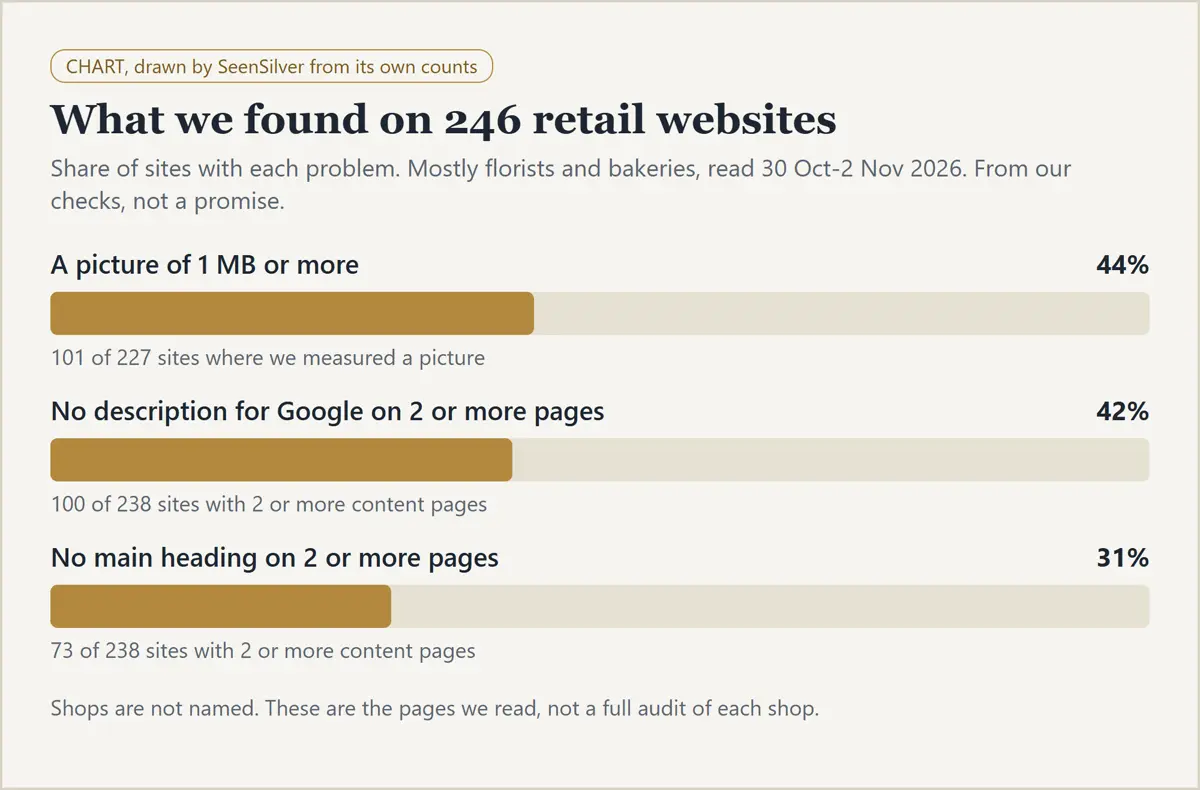
We read the websites of 246 retail shops, mostly florists and bakeries. Three errors showed up again and again. Each one is small, each one is free to check, and each one can quietly send a buyer to someone else. This page covers all three: what it is, what it does to you, how to check yourself in two minutes, and the fix.
Where the numbers come from. SeenSilver's own checks of 246 retail websites in Australia, Ireland, Singapore, the UK, Malaysia and the UAE. We read the home page and up to nine inner pages of each, with no login, between 30 Oct and 2 Nov 2026, and counted on 6 Nov 2026. These are the pages we read, not a full audit of each shop. The shops are not named.
Published 6 Nov 2026.
Error 1: Pictures that are too heavy
What it is. A shop photo saved straight from a camera or phone, often several megabytes, put on the page without making it smaller. Of the 227 shops where we could measure a picture, 101 (44%) had at least one picture of 1 MB or more.
What it does to you. Google notes that images are often the largest part of a page's size, which can make pages slow and expensive to load. A slow page on a phone, with a customer on mobile data, is a customer who goes back to the results. For a shop that lives on walk-by and last-minute buyers, a slow page can mean a lost sale.
Check yourself (2 minutes). Open your home page on your phone, using mobile data and not wifi. Count how long the main photo takes to show. Then right-click a picture on a computer and look at the file size, or use Google's free PageSpeed Insights.
The fix.
- Resize photos to the size they are shown: usually no wider than about 1,600 pixels for a banner, and far less for a product.
- Save them in a compressed format (WebP or a compressed JPEG). Most website builders have an "optimise images" setting.
- Keep the first picture on the page the lightest.
- Keep each picture sharp. Google says clear photos appeal to people more than blurry ones.
- Give each picture a short alt text that says what it shows, such as "Hand-tied pink peony bouquet", without stuffing keywords.
Error 2: No description for Google
What it is. Under every result on Google there is a short summary. It can come from the "meta description" you write for each page. Of the 238 shops with two or more content pages, 100 (42%) had at least two pages with no description at all.
Want a second pair of eyes on your own setup?
What it does to you. Google says it mainly builds snippets from the content on the page, and may use your meta description when it gives a better summary. It does not promise to use it. With no description, you leave the summary to chance. A clear one tells a stranger what you sell, where you are and what to do next, before they tap. A random scrap of text does not.
Check yourself (2 minutes). Search your shop name on Google and look at the summary under each of your pages. Does it say what the page is, or is it empty, cut off, or a menu word?
The fix. Write a different description for each important page: the home page, each product group, delivery, contact. Say what the page offers in one or two plain sentences, with useful facts such as your area and delivery days. Do not stuff it with keywords.
Error 3: No main heading
What it is. Each page should have one main heading, the big line at the top that says what the page is. In website code it is called the h1. Of the 238 shops with two or more content pages, 73 (31%) had at least two pages with no main heading.
What it does to you. A visitor who lands on a page with no clear heading has to guess where they are, and a search tool has less to go on. A page that opens with "Birthday cakes in Subang Jaya, baked to order" tells both of them what they are looking at, at once.
Check yourself (2 minutes). Open each main page and ask: does the top line say what this page is? Some themes use a logo or slogan as the biggest line, which is not the same thing.
The fix. Give each page one clear heading in plain words, with the product and, where it fits, the area. Your website builder usually calls it "Heading 1" or "Title".
A short checklist
- ☐ Home page loads quickly on a phone using mobile data
- ☐ No picture is much larger than the size it is shown at
- ☐ Each picture has alt text saying what it shows
- ☐ Each important page has its own short description
- ☐ Each page has one clear main heading, with the product and area
- ☐ Same check booked in for next month
Frequently asked questions
How do I know if my shop website has these errors?
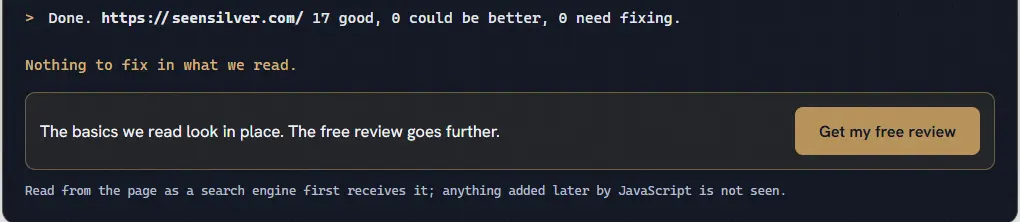
The two-minute checks above find all three. Or try our free instant check on the SeenSilver home page, which reads your page the way a search tool first receives it and marks the basics: good, could be better, or needs fixing.
Will fixing them get me more customers or a higher Google ranking?
We cannot promise that. These are basics that make a page faster and clearer for visitors and for Google, and we found them often. We have not measured how much each one affects sales, and nobody can honestly guarantee a ranking.
Do I need a developer?
Often not. Resizing pictures, writing descriptions and setting a main heading can be done in most website builders. If your site is custom-built, or you would rather not touch it, ask for help.
Want us to look at your shop's website?
The first look is free: a short review of your website and how you show up on Google, written in plain words, with no obligation. Get my free review. If you want us to do the fixing, our SEO audit starts from $500, or from $400 with the code PROMO20 until 30 Nov 2026 (see packages). For the Google side of the story, see how to appear in Google AI Overviews and why a business does not show on Google Maps. We do not promise a search ranking or more customers.
Written by James Kway.
Sources
- Google Search Central, "Image SEO best practices": https://developers.google.com/search/docs/appearance/google-images (read 6 Nov 2026)
- Google Search Central, "How to Write Meta Descriptions" (snippets): https://developers.google.com/search/docs/appearance/snippet (read 6 Nov 2026)
Want a second pair of eyes on your own setup?