

If you want to know how to appear in AI Overviews, start here: there is no form to fill in and no special code that puts your business into Google's AI Overviews. Google says so itself. What you can do is make your pages easy for Google to find, read and trust, and make them answer the questions your customers really ask. That gives your pages a fair chance of being linked. It is not a promise, and nobody can honestly sell you one.
Published 29 Oct 2026. Updated 5 Nov 2026: new steps, our own findings from 53 clinic websites, and two more FAQs. Updated 11 Nov 2026: a short section on generative engine optimization (GEO).
Below: what Google has said, what is guesswork, six steps in the order we would do them (each with "do this" and "check this"), and what we see on real clinic sites.
What an AI Overview is, and how you can show up in one
AI Overviews are the AI-written summaries that sometimes appear at the top of Google's results. They answer the search in a few paragraphs and usually link to the pages they drew on. Google shows one only when it decides it adds value beyond normal results, so many searches never get one.
To show up in an AI Overview, a business can appear in two ways:
- As a link next to or inside the summary, pointing to one of your pages.
- As a mention in the summary text, for example when someone asks for options in an area.
Both depend on Google being able to find, read and trust your pages.
What Google has said
Google's guidance for site owners is short. In plain words:
Want a second pair of eyes on your own setup?
- To be used as a supporting link, a page must be indexed and eligible to be shown in Google Search with a snippet. There are no extra technical requirements.
- Google says there are "no additional requirements to appear in AI Overviews or AI Mode, nor other special optimizations necessary."
- You do not need new machine-readable files, AI text files or special markup.
- The ordinary basics still apply: pages Google can crawl, internal links, text-based content, a good page experience and up-to-date Business Profile information.
- Meeting every requirement does not guarantee a page is crawled, indexed or shown.
- Visits from AI features are counted inside your normal "Web" results in Search Console. There is no separate report.
Google may change this, so read its current page rather than relying on any summary, including this one.
What is guesswork
Plenty of advice promises a "method" to get in Google AI Overviews. Some of it is sensible search practice under a new name. Some of it is guesswork. Be careful with claims about secret signals, special file formats or guaranteed placements. If someone says they can guarantee your business appears, ask how, and ask for it in writing.
Is this the same as generative engine optimization (GEO)?
Mostly, yes. Generative engine optimization, or GEO, is the name some people use for making a website easy for AI answers to read: ChatGPT, Perplexity and Google AI Overviews. For Google, it comes down to the same search basics as the steps below. Nobody can promise a mention. We explain the work in plain words on our page about generative engine optimization (GEO).
Step 1: Make sure Google can read your pages
Do this: open Google Search Console (free) and look at which pages are indexed. Remove any accidental noindex tag or robots.txt block. Check that no page carries a nosnippet setting. Google says that nosnippet, data-nosnippet, max-snippet and noindex limit what is shown from a page in Search, and a page that cannot show a snippet is not eligible to be a supporting link. These settings are sometimes added by a theme or plugin without anyone noticing.
Check this: paste one important page into the URL Inspection tool. It should say the page is on Google. If your treatment or service pages are not indexed, nothing else on this list matters yet.
Step 2: Put a clear answer near the top of each page
AI Overviews respond to questions. A page that states its answer early is easier to use than one that opens with three paragraphs of history.
Do this: for each main service, write down the questions customers actually ask: what it is, who it suits, how long it takes, what affects the cost, how to book. Answer each in plain words, with the most useful answer first. A short visible FAQ at the bottom is a simple way to do it.
Check this: read the first screen of the page on your phone. Could a stranger tell what you offer, where, and what to do next?
Step 3: One page per service, with a title a stranger can read
A single page listing every service is hard to match to a specific question. A clear page for each main service gives Google something specific to point to.
Do this: give each main service its own page. Put the treatment and the area in the page title, and write a short description for the page (the "meta description"). A weak title is "Home". A clearer one is "Dental check-ups and braces in Subang Jaya | Smile Dental" (a made-up example to show the pattern, not a real clinic).
Check this: search your own business name and one service. Do your titles tell a stranger what each page is?
Step 4: Show who is behind the business
Do this: make a visible About page with the people involved, their roles, where you are and how to reach you. For clinics, describe qualifications accurately and within your local advertising rules. Put an author name on articles.
Check this: can a patient find your phone number and address in two taps from any page?
Step 5: Keep your details the same everywhere
AI answers draw on more than one source. If your name, address, phone number and hours differ between your website, your Google Business Profile and directories, an answer may be wrong or may leave you out. Google lists up-to-date Business Profile information among the basics.
Do this: pick one correct version of each detail and update every place. Our guide to fixing your Google Business Profile gives the order.
Check this: search your phone number in quotes. The same name and address should appear every time.
Step 6: Check what is actually shown, and repeat
Do this: search the questions your customers ask, in a private window, and note whether an AI Overview appears, what it says and which sites it links to. Do it once a month with the same questions and keep a short log. The method is the same as in how to check what ChatGPT says about your business, so you can do both in one sitting.
Check this: the sites that are linked show what kind of page Google chose for that question. Study them, then compare with your own page.
A real example from our own work: Tanaman's journal
Tanaman Garden Co. is a garden-building business we work with. Its website has a journal, and each article is written the way this guide describes: one page for one question a customer would ask (for example, what a condominium garden costs to maintain, how drainage copes in heavy rain, whether to rent or buy office plants), the plain answer near the top, the author and date visible, and the real go-live date on each article, never back-dated. The journal has seven articles; the newest three went live on 5 Nov 2026.

What we see on real clinic websites
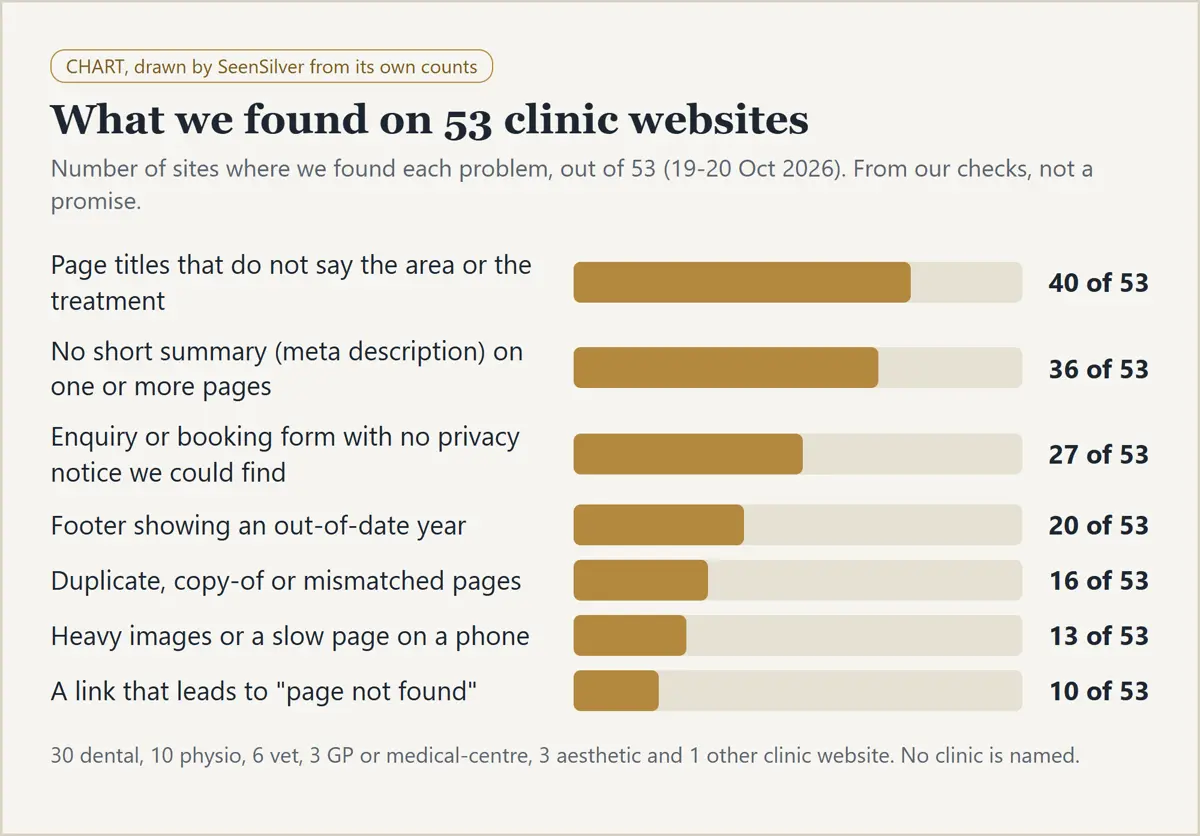
We read the public pages of 53 clinic websites: 30 dental, 10 physio, 6 vet, 3 GP or medical centres, 3 aesthetic clinics and 1 other. We do not name any clinic. The numbers are "sites where we found this problem", not a full audit of each site, and a page or policy may exist where we did not look.
| What we found | Sites | Out of |
|---|---|---|
| Page titles that do not say the area or the treatment | 40 | 53 |
| No short summary (meta description) on one or more pages | 36 | 53 |
| Enquiry or booking form with no privacy notice we could find | 27 | 53 |
| Footer showing an out-of-date year | 20 | 53 |
| Duplicate, copy-of or mismatched pages | 16 | 53 |
| Heavy images or a slow page on a phone | 13 | 53 |
| A link that leads to "page not found" | 10 | 53 |
Two things to say plainly. This is from our checks, not a promise: we have not measured whether any of these problems stops a site appearing in AI Overviews. And the top two, unclear titles and missing summaries, are what Step 3 fixes, for the cost of an afternoon.
You can see the breakdown for your type of clinic, with a free check: all clinics, dental, physio, vet, GP and medical centres and aesthetic clinics.
A short checklist
- ☐ Important pages indexed, according to Search Console
- ☐ No accidental noindex, robots.txt block or nosnippet
- ☐ A clear answer near the top of each service page
- ☐ One page per main service, with treatment and area in the title
- ☐ A short description on each main page
- ☐ About page with real people, roles and contact details
- ☐ Name, address, phone and hours match site, profile and directories
- ☐ Monthly check of the same questions, with a log
Frequently asked questions
How do I show up in AI Overviews?
Make sure your pages are indexed and can show a snippet, answer real customer questions clearly, and keep your business details consistent. Google says there are no special extra steps. Whether a page is shown is Google's decision.
How long does it take to get in Google AI Overviews?
There is no fixed time, and no guarantee that it will happen. Google says indexing and serving are not guaranteed. Make the fixes, then repeat the same monthly check and compare.
Can I opt my business into AI Overviews?
There is no opt-in. If your pages are indexed and eligible for snippets, they can be considered.
Can I stop my pages appearing in AI Overviews?
Google says its snippet controls (nosnippet, data-nosnippet, max-snippet and noindex) limit what is shown from your pages in Search, and that is where AI features pull from. They also limit ordinary snippets, so think before using them. Google points to its separate Google-Extended setting only for AI training and grounding in some of its other systems.
Does schema markup get me into AI Overviews?
Google says no special markup is needed. If you use structured data, keep it accurate and matching the visible text.
Want to know where you stand?
SeenSilver's free website review is a short review of your website and how you show up on Google, including AI answers, written in plain words, with no obligation. Ask for your free website review. Our GEO page shows what GEO work involves. Ongoing AI-search checks are part of our monthly packages. We do not promise a search ranking, or that Google or any AI assistant will mention your business.
Sources
- Google Search Central, "AI features and your website": https://developers.google.com/search/docs/appearance/ai-features (read 5 Nov 2026)
Want a second pair of eyes on your own setup?